HDRezkaSpeeds
HDRezka Speed Controller




| English | Русский |
English
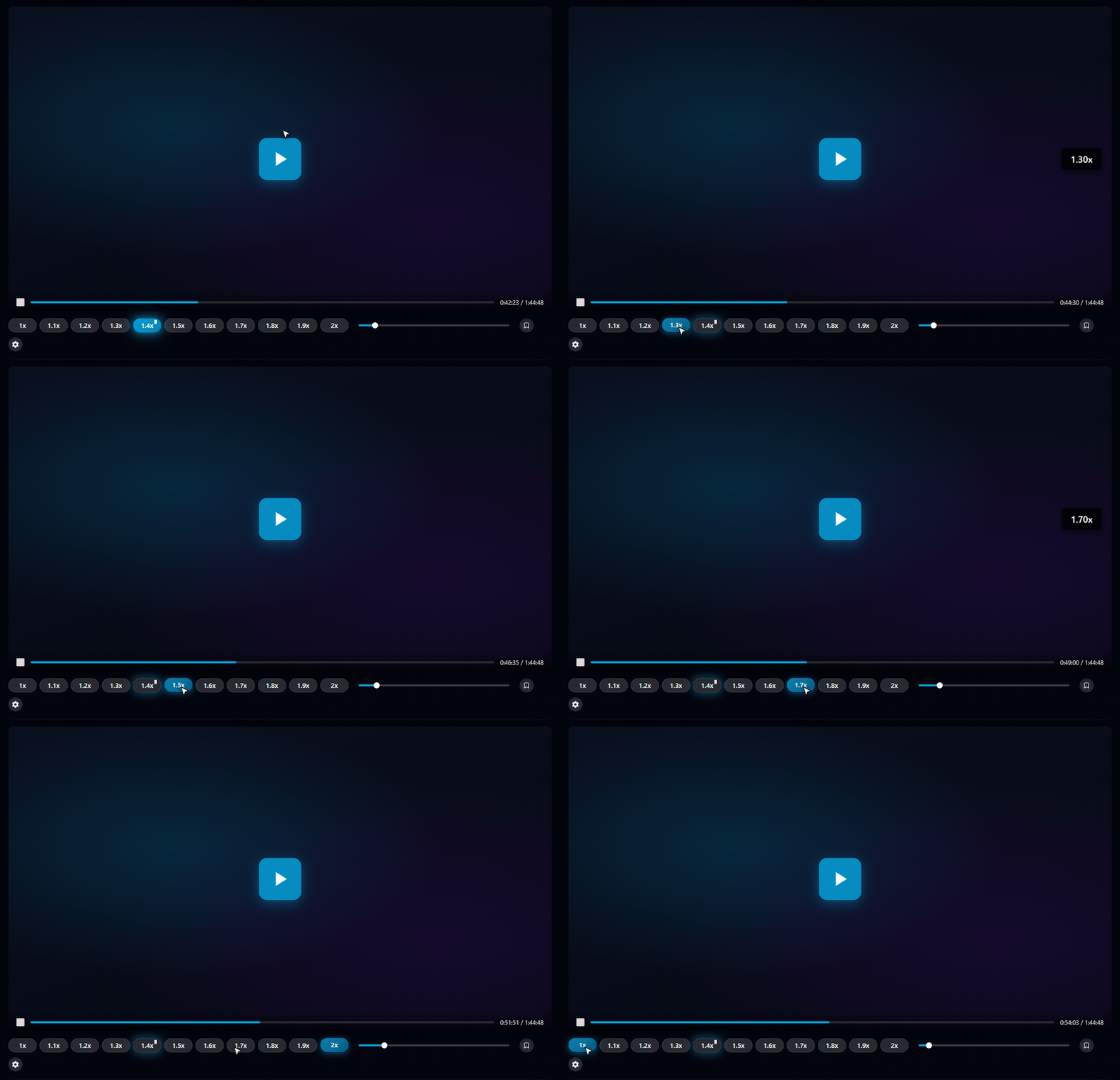
Browser extension (Chrome MV3 + Firefox MV3) that adds an always-visible row of speed buttons, a fine-grained slider, and customizable keyboard shortcuts to the HDRezka video player.
Bilingual interface (English / Russian). No ads, no telemetry.
Features
- 11 preset speed buttons (1.0x – 2.0x in 0.1 steps), tuned for movie playback. Power users can add any custom value up to 10x.
- Slider for in-between values, with a coloured fill that tracks the current speed.
- Click = temporary speed for this video. Double-click = save as default.
- Configurable hotkeys (default
Alt+.+0.1 /Alt+,−0.1,Alt+0resets to 1x). Supports multiple combos per action (keyboard + remote). - In-player gear menu: General / Keys / Mirrors / Diagnostics / Support tabs.
- Toolbar popup mirrors the in-player menu.
- Auto-follows HDRezka’s light / dark theme toggle.
- Supports all known mirrors out of the box:
hdrezka.ag,rezka.ag,hdrezka.me,hdrezka.co,hdrezka.website,hdrezka.cm,hdrezka-home.tv,rezkify.com,rezkery.com,kinopub.me,standby-rezka.tv. - Custom mirrors — HDRezka domains rotate constantly, so you can add your own: open a new mirror, click the toolbar icon and hit “Add … as a mirror” (or type the domain manually in the Mirrors tab). The browser asks for permission for that site only; the list is stored locally, survives updates, and travels with settings export/import.
Reliability
When HDRezka ships a layout change, the panel recovers automatically through a five-strategy discovery chain (cached selector → exact match → substring match → walk up from the video element → geometric heuristic). A built-in watchdog detects broken state, purges bad cache entries, and re-attaches the panel. Plyr’s playback rate persistence is intercepted so the player can’t race the extension’s restore on every episode change.
Privacy
- All settings stored locally in
browser.storage.local. - Zero telemetry, zero analytics, zero remote calls.
- AMO
data_collection_permissionsdisclosure:none.
See PRIVACY.md.
Install
- Firefox AMO — Install from AMO ✅ approved
- Chrome Web Store — (under review)
Manual install from a build (Chrome, until the CWS listing is approved):
git clone https://github.com/danscMax/HDRezkaSpeeds.git
cd HDRezkaSpeeds
npm install
npm run build           # → .output/chrome-mv3/
npm run build:firefox   # → .output/firefox-mv3/
Then in Chrome → chrome://extensions → enable Developer mode → “Load
unpacked” → point at .output/chrome-mv3/. Firefox → about:debugging
→ “This Firefox” → “Load Temporary Add-on…” → pick
.output/firefox-mv3/manifest.json.
Develop
npm run dev             # Chrome MV3 with hot reload
npm run dev:firefox     # Firefox MV3 with hot reload
npm run typecheck       # tsc --noEmit
npm run test            # vitest unit tests
npm run test:smoke      # Playwright extension smoke (needs `npx wxt build` first)
Maintenance & twin sync
This project shares most of src/ with the sibling
VideoSpeeds extension
(YouTube + RuTube) by copy-paste. Before each release:
npm run drift— compares the shared core against the sibling checkout (../VideoSpeedsby default) and lists drifted files.- Port bug fixes in shared modules (
discovery/,storage/,speed/,health/,ui/,i18n/framework) to the twin unless site-specific. npm run typecheck && npm testin BOTH repos.
Project layout
src/sites/— HDRezka site bootstrap, Plyr localStorage patch, URL allow-list (/films/*.html,/series/*.html, etc.).src/discovery/— multi-strategy DOM resolver for the player and info containers.src/ui/— panel, slider, settings modal, theme detection.src/storage/— settings + speed stores backed bybrowser.storage.local.src/health/— watchdog + structured diagnostic report.src/i18n/— bilingual dictionary (EN/RU).src/entrypoints/— content script, background SW, popup, welcome page.tests/store-screenshots/— Playwright script that renders the store-listing screenshots intodist-store-assets/screenshots/.
Sister project
VideoSpeeds — the same
controller for YouTube + RuTube. Two extensions are kept separate
so each can declare narrow host_permissions in its manifest, which
makes Chrome Web Store and AMO review faster.
License
GPL-3.0-or-later. See LICENSE.
Русский
| English | Русский ↑ к началу |
Расширение для браузера (Chrome MV3 + Firefox MV3), которое добавляет всегда видимую панель кнопок скорости, точный ползунок и настраиваемые горячие клавиши в плеер HDRezka.
Двуязычный интерфейс (English / Русский). Без рекламы, без телеметрии.
Возможности
- 11 кнопок скорости (1.0x – 2.0x с шагом 0.1), подобранных под просмотр фильмов. Можно добавить любое своё значение до 10x.
- Ползунок для промежуточных значений с цветной заливкой, отражающей текущую скорость.
- Один клик — временная скорость для этого видео. Двойной клик — сохранить как основную.
- Настраиваемые горячие клавиши (по умолчанию
Alt+.+0.1 /Alt+,−0.1,Alt+0сбрасывает на 1x). Можно назначить несколько комбинаций на одно действие (клавиатура + пульт). - Меню на шестерёнке: вкладки «Общие» / «Клавиши» / «Зеркала» / «Диагностика».
- Иконка в тулбаре открывает то же меню без открытия видео.
- Автоматически следует за темой HDRezka — переключение светлый/ тёмный режим панель подхватывает «на лету».
- Поддержка всех известных зеркал из коробки:
hdrezka.ag,rezka.ag,hdrezka.me,hdrezka.co,hdrezka.website,hdrezka.cm,hdrezka-home.tv,rezkify.com,rezkery.com,kinopub.me,standby-rezka.tv. - Свои зеркала — домены HDRezka постоянно меняются, поэтому зеркала можно добавлять самому: откройте новое зеркало, кликните по иконке расширения и нажмите «Добавить … как зеркало» (или введите домен вручную на вкладке «Зеркала»). Браузер запросит доступ только к этому сайту; список хранится локально, переживает обновления и переносится вместе с экспортом/импортом настроек.
Надёжность
Когда HDRezka меняет вёрстку, панель восстанавливается автоматически
через цепочку из пяти стратегий поиска (кеш → точное совпадение →
подстрока → подъём от <video> → геометрическая эвристика).
Встроенный watchdog обнаруживает поломки, очищает плохой кеш и
переустанавливает панель. Сохранение скорости Plyr перехватывается,
поэтому плеер не сбрасывает выбранную скорость на каждой смене
серии.
Приватность
- Все настройки хранятся локально в
browser.storage.local. - Никакой телеметрии, никакой аналитики, никаких удалённых вызовов.
- Декларация AMO
data_collection_permissions:none.
См. PRIVACY.md.
Установка
- Firefox AMO — Установить из AMO ✅ одобрено
- Chrome Web Store — Установить из Chrome Web Store ✅ одобрено (Chrome / Edge / Brave / Яндекс.Браузер)
Ручная установка из исходников:
git clone https://github.com/danscMax/HDRezkaSpeeds.git
cd HDRezkaSpeeds
npm install
npm run build           # → .output/chrome-mv3/
npm run build:firefox   # → .output/firefox-mv3/
Затем в Chrome → chrome://extensions → включить «Режим
разработчика» → «Загрузить распакованное расширение» → указать на
.output/chrome-mv3/. В Firefox → about:debugging → «Этот
Firefox» → «Загрузить временное дополнение…» → выбрать
.output/firefox-mv3/manifest.json.
Разработка
npm run dev             # Chrome MV3 с горячей перезагрузкой
npm run dev:firefox     # Firefox MV3 с горячей перезагрузкой
npm run typecheck       # tsc --noEmit
npm run test            # vitest unit-тесты
Структура проекта
src/sites/— bootstrap для HDRezka, патч localStorage Plyr, allow- list URL (/films/*.html,/series/*.htmlи т.д.).src/discovery/— многострочный resolver DOM-элементов плеера и info-блоков.src/ui/— панель, ползунок, меню настроек, детекция темы.src/storage/— хранилища настроек и скорости поверхbrowser.storage.local.src/health/— watchdog + структурированный отчёт диагностики.src/i18n/— двуязычный словарь (EN/RU).src/entrypoints/— content script, background SW, popup, welcome.tests/store-screenshots/— Playwright-скрипт, который генерирует скриншоты для листингов вdist-store-assets/screenshots/.
Связанный проект
VideoSpeeds — тот же
контроллер для YouTube + RuTube. Два расширения сделаны
отдельно, чтобы каждое могло объявлять узкие host_permissions в
манифесте — это ускоряет ревью в Chrome Web Store и AMO.
Лицензия
GPL-3.0-or-later. См. LICENSE.